First let’s start by understanding what AI-personalized LinkedIn outreach actually means. It denotes using AI to tailor messages based on a person’s role, industry, or activity instead of sending generic copy-paste texts.
Why AI is now part of modern outreach
LinkedIn outreach has changed. People spot templates instantly, inboxes are crowded, and most buyers already have context before they reply.
AI personalization helps you keep outreach relevant at scale—without spending hours researching every profile.
Are you also still sending the same message to everyone?
Use Konnector to personalize your mass outreach with AI messaging.
Why Bad Personalization Feels “Creepy”
Bad personalization doesn’t fail because people dislike relevance.
It fails because it crosses an invisible comfort line.
On LinkedIn, users expect professional context, not personal analysis.
When a message feels intrusive, over-researched, or oddly specific, the brain immediately flags it as unsafe or automated—even if the intent was good.
The difference between effective personalization and creepy outreach isn’t effort.
It’s boundaries.
Below are the most common reasons personalized LinkedIn messages backfire.

It uses over-personal details
If your message references something too private, too specific, or too “off-platform,” it triggers the same reaction as being watched.
Good personalization is professional, not personal.
Creepy personalization feels like: “I zoomed into your life.”
Smart personalization feels like: “I understand your work context.”
It pulls old or irrelevant references
Mentioning a post from years ago, a job they no longer have, or an outdated achievement makes you look like you’re scraping data instead of paying attention.
If the reference isn’t recent or clearly relevant, skip it.
It sounds scripted or fake
Over-polished lines, forced excitement, or overly perfect structure makes people assume it’s automated—even if it isn’t.
The fix is simple: write like a real person who respects time.
It tries too hard to impress
Name-dropping, inflating compliments, or packing the opener with “look how much I know about you” energy is what breaks trust.
You don’t need deep research to be relevant. You need the right angle.
Why Personalization Still Matters in LinkedIn Outreach
Despite the rise of automation, personalization hasn’t lost its power—it’s become more important.
As inboxes fill up with templated outreach, people don’t respond to effort alone.
They respond to relevance.
Personalization works because it shows intent. It signals that the message was created with a specific role, problem, or context in mind—not sent to a random list. When done right, it doesn’t feel impressive or intrusive. It feels appropriate.
In modern LinkedIn outreach, the goal of personalization isn’t to stand out loudly.
It’s to fit in naturally with the conversations your audience is already having.

Relevance drives replies
Most people don’t ignore outreach because they hate networking.
They ignore it because it doesn’t feel meant for them.
Personalization works when it answers one silent question fast: “Why are you reaching out to me specifically?”
Familiarity builds trust
A small, accurate context cue—role, industry, problem space, or recent activity—creates familiarity.
It shows you’re not spamming.
It also makes it easier for someone to respond with a simple “Yes” or “Not right now.”
Simple context works better than heavy research
You don’t need to mention their university, hobbies, or personal milestones.
In B2B, the best personalization is usually one line of context plus one clear reason to talk.
Want to turn smart personalization into a full sales system?
See how top teams get 30%+ replies with automated LinkedIn sales sequences.
What Data Is Safe to Use for Personalization
Not all data is fair game in LinkedIn outreach.
Safe personalization uses information people have intentionally made visible in a professional context. It focuses on work, not life. Signals, not assumptions.
When outreach is built on public, role-relevant data, it feels respectful and timely. When it relies on inferred or scraped personal details, it feels invasive—even if the message is technically accurate.
The rule is simple: if the context helps start a professional conversation, it’s safe to use. If it explains someone’s personal life, motivations, or behavior, it’s not.
Job title
Job title helps you frame the conversation correctly.
A Head of Sales and a RevOps Manager care about different outcomes, even if they work in the same company.
Use title-based context to make your message feel targeted without being intrusive.
Company type
A startup, a mid-market team, and an enterprise org operate differently.
Company type helps you set realistic assumptions about speed, tools, processes, and priorities.
Industry
Industry context lets you use familiar language.
It also helps you avoid generic lines like “I help businesses grow,” which usually means nothing.
Recent post or activity
This is one of the safest and strongest personalization inputs—if it’s recent and relevant.
Reference what they chose to share publicly, and keep it light:
You’re not analyzing their thoughts. You’re responding to their visible work signal.
Shared groups or events
Shared context reduces friction.
It’s not “we’re strangers.” It’s “we’re in the same room.”
Use shared groups/events as a simple opener, not as proof of closeness.
Where Konnector fits: Tags + AI comments
Konnector makes this easier by helping you segment leads using tags and then personalize outreach based on the right context bucket.
Instead of rewriting everything from scratch, you can build role-based and industry-based variations that still sound human.
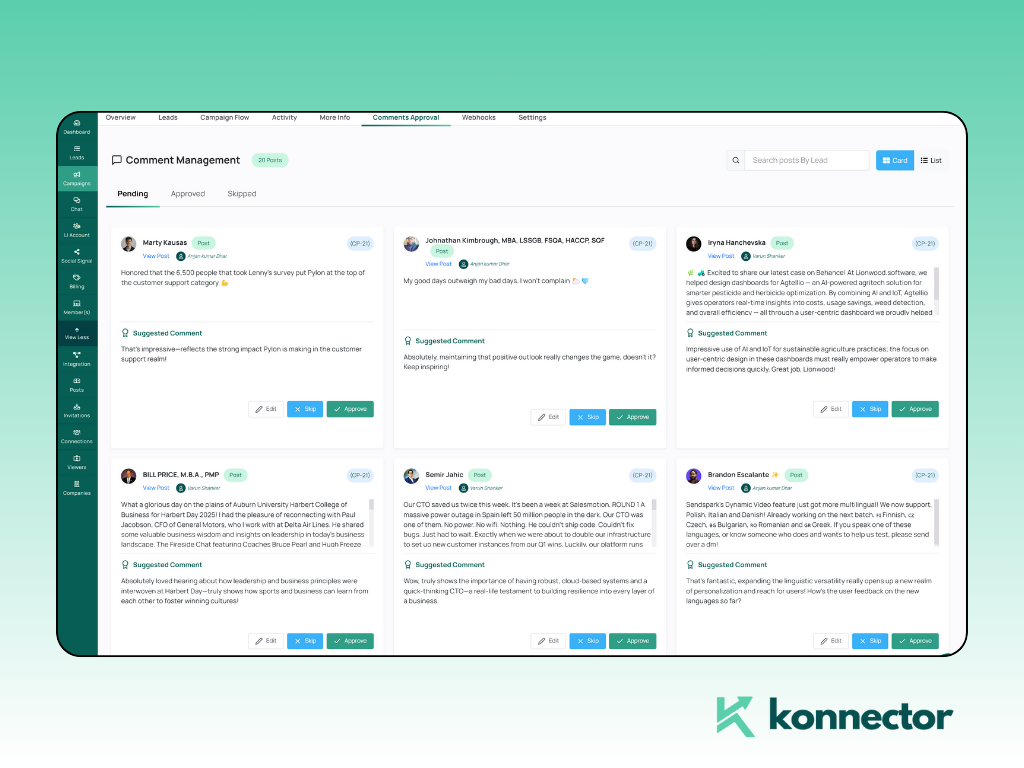
Plus, Konnector’s AI-generated comments are designed to be valid and relevant—so your engagement supports your outreach naturally, without forced “nice post!” energy.
How AI Should Be Used in LinkedIn Outreach
AI works best in LinkedIn outreach when it supports human intent instead of replacing it.
The goal of using AI isn’t to send more messages. It’s to send better ones—faster, more consistently, and with fewer mistakes. When AI is used thoughtfully, it helps teams stay relevant at scale without losing tone, timing, or trust.
The problem starts when AI is treated as the brain of outreach instead of the assistant. That’s when messages feel over-engineered, impersonal, or disconnected from real conversations.
Used correctly, AI helps you systemize relevance while keeping the message human.
AI as an assistant, not a replacement
AI should speed up thinking, not replace it.
The best outreach still comes from a clear intent:
Who is this for, why now, and what’s the next step?
Use AI to draft, refine, and adapt.
You decide the logic, tone, and boundaries.
Best uses of AI personalization
AI personalization is most effective when it focuses on patterns, not people.
Instead of trying to sound deeply personal, AI should help you apply the right context to the right audience segment—consistently and at scale. This keeps messages relevant without crossing professional boundaries.
The strongest use cases for AI in LinkedIn outreach are predictable, repeatable, and role-aware—where relevance matters more than creativity.

Role-based messaging
AI can quickly generate variations tailored to different job functions—without changing your core offer.
That means your message stays consistent, but the framing shifts to match what the person actually cares about.
Industry-based context
AI can help you swap examples, pain points, and language so you sound native to the industry.
This is where personalization feels smart (not creepy) because it’s about business context.
Activity-based openers
AI is great for turning a recent post into a short, natural opener.
The rule: reference the topic, not their personality.
Keep it one line, then move to the reason for outreach.
What AI should never do
There are clear lines AI should not cross in LinkedIn outreach—no matter how advanced the tool or how good the data.
When AI moves from assisting communication to interpreting personal intent, it breaks trust. Even accurate guesses can feel invasive if they weren’t explicitly shared or are not relevant to a professional conversation.
The safest rule is this: if a human wouldn’t feel comfortable saying it to a stranger in a first message, AI shouldn’t write it either.
Never guess someone’s personal life
No assumptions about relationships, health, family, location, finances, or lifestyle.
Even if AI can infer it, you shouldn’t use it.
Keep personalization professional.
Never over-analyze profiles
Avoid messages that feel like a report:
“I noticed you did X in 2018, then Y in 2020, and your career trajectory suggests…”
That’s not personalization. That’s surveillance vibes.
Never try to sound “too perfect”
AI can write clean lines, but over-clean messaging looks automated.
A little simplicity beats “marketing voice” every time.
Use AI to scale relevance, not awkwardness.
Book a demo today!
All in all, AI-generated comments can support your visibility without fake engagement.
AI-assisted message suggestions can speed up outreach without losing your voice.
Role-based and industry-based personalization keeps messages relevant at scale.
AI should make outreach feel human, not weird.
If you want replies, the goal isn’t to “personalize harder.” It’s to personalize smarter—using safe, visible, professional signals and a tone that respects boundaries.
Use Konnector.ai to personalize LinkedIn outreach with the right balance of relevance, timing, and tone, so you get replies without crossing the line.

11x Your LinkedIn Outreach With
Automation and Gen AI
Harness the power of LinkedIn Automation and Gen AI to amplify your reach like never before. Engage thousands of leads weekly with AI-driven comments and targeted campaigns—all from one lead-gen powerhouse platform.
Frequently Asked Questions
AI-personalized LinkedIn outreach is the use of artificial intelligence to adapt outreach messages based on professional signals like job title, industry, company type, or recent LinkedIn activity instead of sending generic copy-paste messages.
Yes, AI personalization is safe when it relies on publicly available, professional data such as roles, industries, and visible activity. It becomes unsafe when it tries to infer personal details or analyze private behavior.
Personalized messages feel creepy when they reference overly personal details, outdated information, or sound overly scripted. This usually happens when AI is used without clear boundaries or human review.
Safe data includes job title, industry, company type, recent posts or activity, and shared LinkedIn groups or events. These signals help create relevant messages without invading privacy.
AI should never guess personal life details, over-analyze profiles, reference private behavior, or try to sound emotionally manipulative. AI should assist relevance, not simulate familiarity.
Yes, when done correctly. Role-based and industry-based personalization improves relevance, which directly increases response rates compared to generic outreach.
Konnector uses AI to support outreach through role-based and industry-based message suggestions, AI-generated engagement comments, and smart tagging—helping teams personalize at scale without sounding automated or intrusive.
No. AI works best as an assistant. Human intent, judgment, and tone are still essential to ensure messages feel natural and respectful.