If you are running a sales team, a lead generation agency, or a multi-SDR outreach operation, you already know that one LinkedIn® account is not enough. LinkedIn®’s weekly connection request limit sits at around 100 per account — which means a team of five SDRs, each with their own profile, gives you roughly 500 connection requests per week before anyone pushes a limit. That is the operational reality that makes multi-account management not just a tactic but a structural requirement for teams serious about LinkedIn®-driven pipeline.
The problem is that LinkedIn®’s detection systems are more sophisticated in 2026 than they have ever been. Accounts that behave in ways that look automated, linked, or coordinated are being flagged, restricted, and in repeat cases, permanently suspended. A single restricted account in a sales team does not just lose its own pipeline — it disrupts the whole outreach operation and can take two to four weeks to recover, if it recovers at all.
This guide is written specifically for the people making decisions about how their team operates on LinkedIn®: sales leaders, RevOps managers, agency founders, and SDR team leads. It covers what LinkedIn® actually detects, how to architect a multi-account setup that scales cleanly, and what a compliant, high-performance outreach operation looks like in practice.
What LinkedIn® actually flags — and what it does not?

Before you can manage multiple LinkedIn® accounts safely, you need to understand what LinkedIn®’s systems are actually looking for. Most teams get this wrong because they focus on the wrong risk factors.
LinkedIn® does not have a fixed rule against managing multiple accounts. What it has is a sophisticated behavioural detection system that looks for patterns inconsistent with genuine human activity. The distinction matters because it shifts the question from “how many accounts can I run” to “how do those accounts behave.”
The patterns that trigger flags most reliably are:
- Shared IP addresses across multiple accounts. When two or more LinkedIn® accounts log in from the same IP address within a short time window, LinkedIn®’s systems read this as a likely shared device or automated environment — and applies scrutiny to both accounts.
- Identical or near-identical activity timing. Multiple accounts sending connection requests at the same time of day, following the same posting schedule, or running identical message sequences are flagged as coordinated behaviour, regardless of whether they belong to different people.
- Sudden volume spikes. An account that jumps from five connection requests per day to fifty will hit LinkedIn®’s anomaly detection within days. Activity ramp-up needs to be gradual — especially for accounts under six months old.
- Low acceptance rates sustained over time. Connection requests that are consistently ignored or marked as “I don’t know this person” are a stronger risk factor than raw volume. LinkedIn® monitors the ratio, not just the number.
- Browser fingerprint matching. If multiple accounts are accessed from the same browser profile — same cookies, same browser fingerprint, same device metadata — LinkedIn® can link them even if the IP addresses differ.
None of these patterns require you to be doing anything technically prohibited. They are signals that LinkedIn® interprets as inauthentic. Managing multiple accounts safely means managing these signals — not just managing the accounts.
The architecture of a safe multi-account LinkedIn® operation
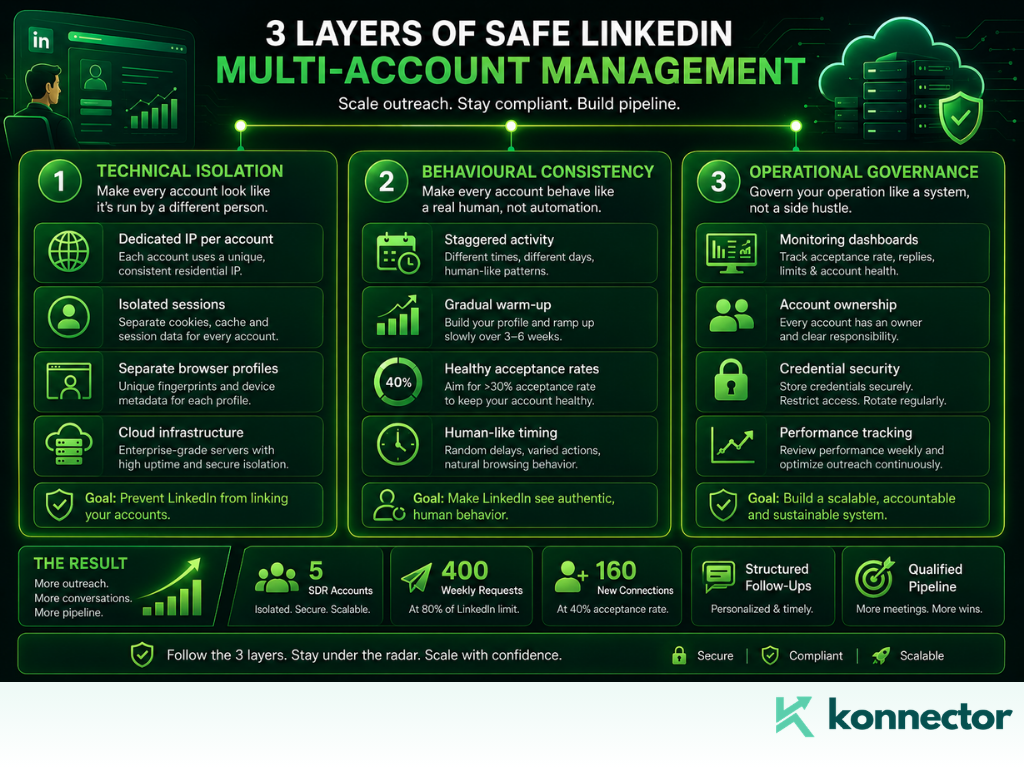
A properly structured multi-account operation has three layers: technical isolation, behavioural consistency, and operational governance. Teams that get flagged have usually addressed one or two of these and ignored the third.
Layer 1: Technical isolation
Every LinkedIn® account you manage — whether it belongs to an SDR, an agency client, or a founder — needs to operate from its own isolated environment. This means:
- Dedicated IP per account. Each account should have its own residential or ISP-based IP address that is used consistently for that account and no other. Shared IPs are the single most common cause of linked-account flags. LinkedIn®’s enforcement system is desktop-first — residential proxies that match the account holder’s geography work significantly better than mobile proxies for this purpose.
- Separate browser profiles or sessions. Each account should run in its own browser profile with distinct cookies, cache, and fingerprint data. Tools like browser profile managers create completely isolated sessions so LinkedIn® cannot correlate accounts through shared browser metadata.
- Separate login credentials. Every account needs a unique email address. This is a baseline requirement — shared credentials or accounts created from the same email domain pattern are easy for LinkedIn® to identify.
Layer 2: Behavioural consistency
Technical isolation prevents LinkedIn® from linking accounts. Behavioural consistency prevents individual accounts from triggering their own restrictions.
- Respect daily and weekly limits — with room to spare. LinkedIn®’s 2026 limits for established accounts are approximately 25 to 50 connection requests per day. New accounts under six months old should stay between 15 and 20. Anything above 50 per day consistently triggers LinkedIn®’s restriction flow within a week. Operating at 70% of the limit is a better long-term strategy than pushing the ceiling.
- Stagger activity across accounts. Never run automation or high-volume outreach on multiple accounts simultaneously. Stagger send times across accounts so the activity patterns are distinct and independently human-looking.
- Warm up new accounts gradually. A new LinkedIn® account should not start sending 30 connection requests on day one. Spend the first two to four weeks building the profile, connecting with genuine contacts, posting content, and engaging with others’ posts. Ramp up outreach activity slowly over weeks, not days.
- Maintain quality ratios. An acceptance rate above 30% is a healthy signal to LinkedIn®’s systems. An acceptance rate below 20% sustained over time attracts scrutiny. This is a targeting and personalisation problem as much as a volume problem — which is where intent-based outreach and LinkedIn® social signals become a compliance tool as well as a performance one.
Layer 3: Operational governance
For teams managing multiple accounts — whether those are SDR profiles within a sales organisation or client accounts within an agency — governance is the layer most often neglected until something goes wrong.
- Document who owns what. Every account in your operation should have a named owner, a designated team member responsible for it, and a record of its activity history. When something goes wrong — a restriction, an unusual acceptance rate drop, a flagged message — you need to be able to diagnose it quickly.
- Centralise credential management. Store login credentials for every account in a secure vault. Restrict access to team members who actually need it. When someone leaves the team, revoke their access immediately and change the credentials for any accounts they had access to.
- Build a monitoring routine. Check acceptance rates, reply rates, and restriction status across all accounts at least weekly. Declining metrics on one account often precede a restriction by several days — if you catch the signal early, you can pause activity and reset before LinkedIn® acts.
The role of cloud-based tools in multi-account safety
One of the most consequential decisions in multi-account management is where your automation runs. Browser extensions — tools that operate through a Chrome or Firefox profile — are inherently riskier than cloud-based tools for multi-account operations, because browser-level automation is easier for LinkedIn® to detect and the session data is harder to isolate cleanly.
Cloud-based platforms run automation from dedicated server infrastructure with separate IP addresses and session management. This means the activity appears to originate from a consistent, isolated environment rather than from a shared browser on a shared machine.
Konnector runs fully in the cloud with activity randomisation and per-account IP control — which is the architecture that keeps multi-account operations safe at scale. Rather than sharing a single browser environment across multiple profiles, each account in Konnector runs in its own isolated session with its own activity cadence. You are not relying on browser profiles staying separate. The separation is built into the infrastructure.
This also means your team can manage multiple accounts — SDR profiles, agency client accounts, founder profiles — from a single dashboard without logging in and out of LinkedIn® repeatedly, without risking cross-account session contamination, and without the operational overhead that comes with juggling browser windows.
Multi-account outreach and LinkedIn® social selling: the performance case

The safety case for structured multi-account management is clear. The performance case is equally compelling.
A five-person SDR team running structured multi-account outreach through Konnector, with each account operating at 80% of LinkedIn®’s weekly limit, produces 400 connection requests per week from clean, isolated, well-warmed profiles. With a 40% acceptance rate — achievable with intent-based outreach built on LinkedIn® social signals — that is 160 new first-degree connections per week entering a structured follow-up sequence.
Compare that to the same team running from a single shared account, or from personal accounts without isolation or signal-based targeting, and the pipeline differential becomes significant within a single quarter.
The key variable is not the number of accounts. It is the quality of the outreach running through them. Multi-account volume without signal-based targeting produces more messages to fewer receptive people. Multi-account volume with intent-based targeting — reaching out when a prospect is actively engaged with a relevant topic — produces more conversations worth having.
This is where Konnector’s social signal tracking integrates directly into the multi-account workflow. The platform surfaces high-intent prospects from your ICP across all accounts simultaneously, ensures no prospect is approached by more than one account in the same sequence, and manages the activity cadence for each profile independently. You get the volume benefits of multi-account outreach without the coordination failures that typically come with managing it manually.
Common mistakes that get multi-account operations flagged
| Mistake | Why it gets flagged | How to fix it |
|---|---|---|
| Multiple accounts on the same IP | LinkedIn® links them as a shared device or automated system | Dedicated IP per account, consistent per session |
| Same browser profile for multiple accounts | Shared cookies and fingerprint data correlate the accounts | Separate browser profiles or cloud-based session isolation |
| Ramping new accounts too fast | Volume spike on a young account triggers anomaly detection | Warm up over 3 to 4 weeks before running campaigns |
| Identical send timing across accounts | Coordinated activity pattern flags as automated | Stagger activity schedules per account |
| Low and declining acceptance rates | Sustained low acceptance triggers outreach restriction | Improve targeting with social signals; reduce volume temporarily |
| No monitoring routine | Restrictions develop gradually — undetected until they escalate | Weekly review of acceptance rate, reply rate, account status |
| Same message templates across all accounts | Identical outreach patterns are flagged as coordinated | Distinct tone and sequence structure per account or persona |
What a well-run multi-account operation looks like?
At its best, a properly architected multi-account LinkedIn® operation is invisible — not to your prospects, but to LinkedIn®’s detection systems. Every account looks like an independent professional doing normal, human LinkedIn® activity at a sensible pace. The coordination happens at the operational level: in how you assign prospects, manage sequences, avoid overlap, and monitor performance. None of that coordination is visible to LinkedIn®.
The teams that do this well share a few things in common. They invest in the right infrastructure upfront rather than retrofitting safety onto a system that was already generating flags. They run outreach based on signals rather than lists. And they review account health metrics weekly rather than waiting for a restriction to tell them something was wrong.
Konnector is built to support exactly this kind of operation — cloud infrastructure, per-account isolation, social signal targeting, human approval queues, and CRM integration that keeps every account’s activity visible and attributable from first touch to closed deal.
Want to see how it maps to your team’s specific setup? Book a demo and we will walk through the multi-account architecture together. Or sign up and start building your first properly isolated campaign today.
Further reading
- Understanding LinkedIn® Social Signals with Konnector
- How to Automate LinkedIn® Without Getting Restricted
- LinkedIn® Outreach Strategy for B2B: What Works in 2026
- LinkedIn® Lead Generation: The Konnector Approach
- Automate Intent-Based Outreach: Profile Views into Pipeline
- Best Outbound Automation Tools: Supercharge Your Sales in 2026

11x Your LinkedIn® Outreach With
Automation and Gen AI
Harness the power of LinkedIn® Automation and Gen AI to amplify your reach like never before. Engage thousands of leads weekly with AI-driven comments and targeted campaigns—all from one lead-gen powerhouse platform.
Frequently Asked Questions
LinkedIn®'s terms prohibit a single individual from maintaining multiple personal profiles. Managing multiple accounts that belong to different real people — such as an SDR team or agency clients — is not prohibited, provided each account operates authentically and independently. The risk comes from how those accounts behave, not from the fact of managing more than one.
For established accounts over six months old, staying between 20 and 40 connection requests per day keeps activity well within safe thresholds. New accounts should stay at 15 to 20 per day during the first month and ramp up gradually. Operating at 70–80% of LinkedIn®'s limit is consistently safer than pushing it, because acceptance rate matters as much as volume — and a lower volume with a higher acceptance rate produces better account health signals.
Konnector runs fully in the cloud with dedicated IP addresses and isolated sessions per account. Each account operates from its own environment — separate IP, separate session data, separate activity cadence — so LinkedIn®'s systems read them as independent profiles rather than coordinated accounts on a shared device. Activity is randomised and staggered per account to ensure each profile maintains a distinct, human-looking behaviour pattern.
Spend the first two to four weeks building the profile fully, connecting with genuine contacts, posting original content two to three times per week, and engaging with others' posts through comments and reactions. Start sending connection requests at low volume — 10 to 15 per day — and increase gradually over the following weeks. Avoid running any automated sequences until the account is at least four to six weeks old and has a network of 100 or more connections.
Track connection request acceptance rate, message reply rate, and InMail response rate weekly per account. A declining acceptance rate — especially below 25% for two to three consecutive weeks — is one of the earliest reliable warning signs before a restriction. If you notice a drop, reduce activity immediately, review your targeting criteria, and pause automation for several days before resuming at a lower cadence.
Yes — if each account represents a real person, has its own activity pattern, and follows safe sending limits. The safest setups maintain isolated sessions, gradual activity growth, and personalised messaging. Problems usually arise when accounts behave identically, send high volumes too quickly, or use low-quality targeting lists.
Not when used correctly. Automation should handle repetitive actions like sequencing, scheduling, and follow-ups, while messaging remains personalised and relevant. The best-performing campaigns combine automation efficiency with human-quality targeting and communication.
Most campaigns begin generating replies within the first one to two weeks, while consistent pipeline impact usually appears after four to eight weeks of steady outreach. Results depend heavily on targeting quality, messaging relevance, account health, and follow-up consistency.
Most temporary restrictions occur because of sudden spikes in activity, poor acceptance rates, or repetitive behaviour patterns. In most cases, reducing activity, pausing automation, and allowing the account to cool down for several days helps restore normal account health. Prevention is far easier than recovery, which is why maintaining conservative limits and healthy engagement patterns is critical.