Quick Question: Can You Automate LinkedIn Comments With AI?
Yes — but not the way most people think. You can use AI to comment on prospects’ LinkedIn posts at scale using Social Signal Intelligence platforms like Konnector.ai. Unlike basic bots that post generic replies, these tools analyze the actual content of each post and generate a context-aware, relevant comment.
The key to doing this safely — without risking your account or your reputation — is the Human-in-the-Loop approach: AI drafts the comment, you approve it with one click, and only then does it get posted. No automation without human oversight. No bots. Just smarter, faster commenting.
At Konnector.AI, this unique feature ensures that you scale your outreach – but keep it personalised. Book a demo today!
The Power of the “Second Feed”: Why Comments Beat DMs
Most LinkedIn outreach strategies are built around the inbox: connection requests, InMail, follow-up messages. But there is a second, largely untapped channel that is more visible, more influential, and better rewarded by the algorithm — the comment section.

Comments Are Public. DMs Are Not.
When you send a DM, only one person sees it. When you leave a thoughtful comment on a prospect’s post, their entire network sees it too. A single well-placed comment on a highly engaged post can put your name in front of hundreds — sometimes thousands — of people who match your ideal customer profile, without sending a single cold message.
Read more—-> AI vs Human: Who Writes Better LinkedIn Comments?
Comments Are LinkedIn’s Top Engagement Signal
LinkedIn’s algorithm classifies comments as the number one signal of “meaningful social interaction.” That classification matters because it directly affects the reach of your own future content. Every time you comment on a prospect’s post, you train LinkedIn’s algorithm to show your content to that prospect more often — creating a compounding visibility loop that makes your outreach warmer over time.
The Familiarity Loop: Comment Before You Connect
Research and practitioner testing consistently shows that commenting on a prospect’s posts two to three times before sending a connection request increases acceptance rates by up to 60%. The reason is psychological: people are more likely to accept a connection from someone who already feels familiar — someone whose name and insights they have encountered in their own feed. Commenting builds that familiarity at scale without a single cold touch.
At Konnector.AI, we leverage the power of automated comments while keeping it personal. Sign up today or book a demo to talk to one of our experts!
Turning Keywords Into Real Conversations With Social Signals
Effective AI commenting is not random. It starts with tracking the right conversations happening in your industry — the posts and threads where your ideal prospects are already engaged and already talking about topics that matter to your business. This is what Social Signal Intelligence makes possible.

Step A: Define Your Industry Keywords
The first step is identifying the keywords that represent your ideal customer profile and the conversations happening around your product or service category. Examples include terms like “SaaS Growth,” “Series A Funding,” “B2B Marketing,” “AI Automation,” and “Hiring SDRs.” These keywords become the filters that Konnector.ai uses to monitor LinkedIn activity in real time.
Once your keywords are defined, Konnector’s Social Signal Intelligence engine tracks three types of activity: posts that mention those keywords, comments where prospects are actively discussing those topics, and engagement from your target audience on related content. The result is a continuously updated stream of high-intent conversations — people who are already talking about the problems your business solves.
It is actually much easier than it sounds, talk to our expert today and see how you can make specific keywords work for you!
Step B: Track Prospects Engaging With Those Keywords
Defining keywords is only the first layer. With the right tool, you can identify the specific people driving and participating in those conversations:
1) Tracking who is posting about those topics?
2) Who is commenting on relevant discussions?
3) Who is reacting to posts that contain your target keywords?
This prospect identification layer is what separates Social Signal Intelligence from generic keyword monitoring.
Instead of finding content, you are finding people – high-intent prospects who are already engaged in conversations relevant to your business. Instead of cold outreach that interrupts, you are entering existing discussions where your prospects are already active and receptive.
Step C: AI Generates Contextual Comments
Once a relevant post is detected, Konnector analyzes the post’s full content — not just its keywords — and generates a context-aware comment that demonstrates genuine reading comprehension. The difference between a bot comment and an AI-generated contextual comment is the difference between noise and signal.
Consider a prospect who posts: “Just visited Lisbon last week for Web Summit. Incredible energy around AI startups.” A generic bot would respond: “Great post! Thanks for sharing.” A Konnector-generated contextual comment would respond: “Lisbon has been buzzing lately with AI startups. Curious — did you find any companies there doing something particularly innovative?” The second comment shows the post was actually read, adds a genuine observation, and opens the door to a real conversation thread — all without a single promotional word.
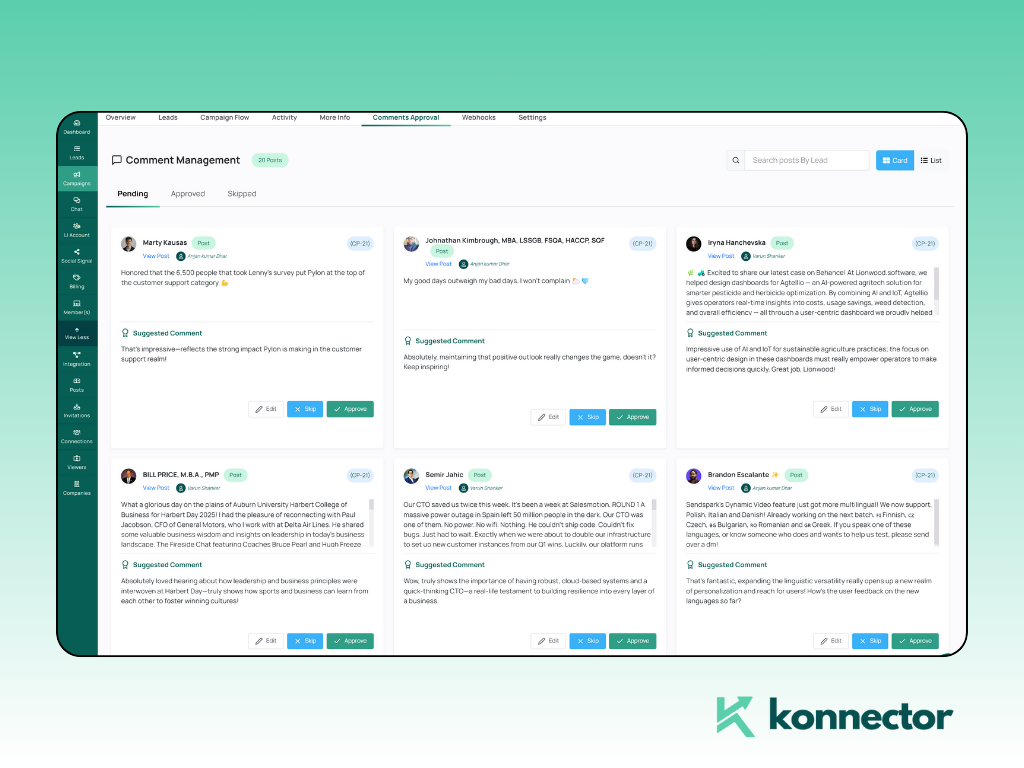
Take a look at how Konnector.ai Comments work:
Step D: Build Relationships Before You Build Pipeline
The goal of AI-assisted commenting is not an immediate sale. It is presence, familiarity, and trust — the foundation that makes every subsequent outreach warmer and more effective. By showing up consistently in a prospect’s feed with relevant, thoughtful contributions, you shift from being a cold name in their inbox to a familiar voice in their professional world.
Even a comment as simple and human as responding to “Just visited Tokyo for the first time” with “Tokyo has been on my travel list for years — any must-visit places you’d recommend?” achieves something no sales pitch can: it makes you a real person, not a vendor. These small, authentic interactions accumulate into a warm relationship before any sales conversation ever begins.
Step-by-Step: Setting Up AI Commenting With Konnector.ai
Here is the complete workflow for launching an AI-assisted commenting strategy using Konnector.ai’s Human-in-the-Loop system.
Step 1: Set Your Social Signal Triggers
Log into Konnector.ai and configure your monitoring parameters. You can track by keyword — entering specific terms your ICP talks about, such as “Series A,” “SaaS growth,” or “hiring SDRs” — or by prospect list, uploading a curated set of high-value target accounts and individuals you want to engage with directly. These triggers determine which posts surface in your commenting queue.

Step 2: Define Your Brand Persona
Before the AI drafts a single comment, you define the voice it writes in. Konnector gives you three default persona frameworks — The Insightful Peer, who adds expertise and asks smart questions; The Supportive Partner, who acknowledges and builds on the prospect’s perspective; and The Thought Leader, who brings a distinct point of view. You can also write custom persona instructions that reflect your specific tone, communication style, and areas of authority.
Step 3: The AI Drafting Phase
When a post matching your triggers is detected, Konnector scans the post URL, processes the full text, identifies the core topic and emotional sentiment, and drafts a one-to-two sentence comment. The comment is designed to add value, demonstrate comprehension, and — wherever possible — end with a light question that invites the prospect to respond and continue the thread.

Step 4: The One-Click Approval Dashboard
Every drafted comment routes to your unified approval dashboard before anything is posted. Here you can see the original post, the AI-generated comment, and the prospect’s profile in a single view. Swipe or click to approve and post immediately, tap to edit the wording or adjust the tone, or skip to pass on the comment entirely. Nothing is ever posted without your explicit approval. This is the Human-in-the-Loop system in action — and it is non-negotiable for account safety and brand integrity.

The system has been tested by experts and is trusted by thousands of customers. Join the bandwagon now! Book a demo with our expert.
Full Control Before Any Comment Is Posted
One of the most common fears about AI-assisted LinkedIn activity is loss of control — the worry that the AI will post something off-brand, tone-deaf, or factually wrong at the worst possible moment. Konnector.ai’s architecture is built around eliminating that risk entirely.
The Three Options on Every Drafted Comment
For every comment Konnector drafts, you have three and only three options. Approve posts the comment immediately, exactly as written. Edit opens the comment for modification — you can adjust tone, add a specific detail, remove a phrase, or rewrite entirely, then approve the edited version. Skip removes the comment from the queue entirely, with no action taken.
What the Human-in-the-Loop System Prevents
This approval layer is not just a safety net for grammar and tone. It catches the edge cases that AI consistently struggles with — sarcasm in a post that reads as straightforward text, a “company update” that is actually announcing layoffs, a post framed as celebratory that is actually a farewell message. AI misreads context. Humans do not. The Human-in-the-Loop system ensures that the human’s contextual intelligence is always the final gatekeeper before your name goes on a comment in a professional network.
The result is a system where AI contributes speed and scale, and you contribute judgment and authenticity. Neither works as well without the other.
3 Rules for AI-Generated Comments in 2026
As AI-assisted engagement becomes more common on LinkedIn, the platform’s detection systems have become more sophisticated. These three rules are not optional best practices — they are the foundation of a sustainable, safe AI commenting strategy.

Rule 1: No Generic Praise
If the comment could have been written without reading the post — “Great insight, thanks for sharing!” or “Really valuable perspective here!” — do not post it. Generic praise is the clearest signal to both LinkedIn’s algorithm and to the prospect themselves that no human actually read their content. Every comment must reference something specific to the post: a detail, an idea, a question raised, a claim made. If Konnector’s AI draft does not pass this test, edit it or skip it.
Rule 2: Always End With a Question
Comments that end with a genuine, light question consistently outperform statements in generating reply threads. A reply thread extends the reach of the original post, signals strong engagement to the algorithm, and — most importantly — opens a natural dialogue with the prospect that can evolve into a real conversation. The question should be curious, not leading. It should invite the prospect’s perspective, not steer them toward a sales conversation. “What was the most surprising part of that experience?” lands differently than “Have you considered how our product could help with that?”
Rule 3: Respect Daily Frequency Limits
In 2026, LinkedIn’s pattern detection systems actively monitor engagement velocity — the speed and volume of actions taken on an account over time. Accounts that comment at unnaturally high frequencies trigger automated review and risk temporary or permanent restrictions. The safe operating range for AI-assisted commenting is five to ten comments per day per account. Spread those comments across different times of day, on posts from different people, across varied topic areas. Consistency over time matters far more than volume on any given day.
Read more—> Harnessing AI Comments to Boost LinkedIn Engagement
Why Fully Autonomous Bots Are a Risk
There are LinkedIn automation tools that will comment on posts without any human review — fully autonomous bots that scan, draft, and post without stopping for approval. The appeal is obvious: zero effort, maximum volume. The risk is equally obvious once you understand how LinkedIn’s systems and your prospects actually work.
The Context Trap
Language models are good at processing literal text. They are poor at detecting the emotional context underneath it. A post that reads “After 8 incredible years, today is my last day at the company” might trigger an AI to comment on career growth and new opportunities — missing entirely that this is a grief post about being laid off. A comment that misreads context like this does not just fail to build the relationship. It actively damages it, and in public, in front of the prospect’s entire network.
LinkedIn’s 2026 Pattern Detection
LinkedIn has invested significantly in identifying inauthentic behavior on the platform. Its current systems specifically flag “unnatural engagement velocity” — accounts that comment at consistent intervals, at high frequency, on posts across unrelated industries, using similar sentence structures. Fully autonomous bots fail every one of these detection tests. The consequences range from reduced content reach to temporary action blocks to permanent account suspension.
Konnector.ai’s Safety Architecture
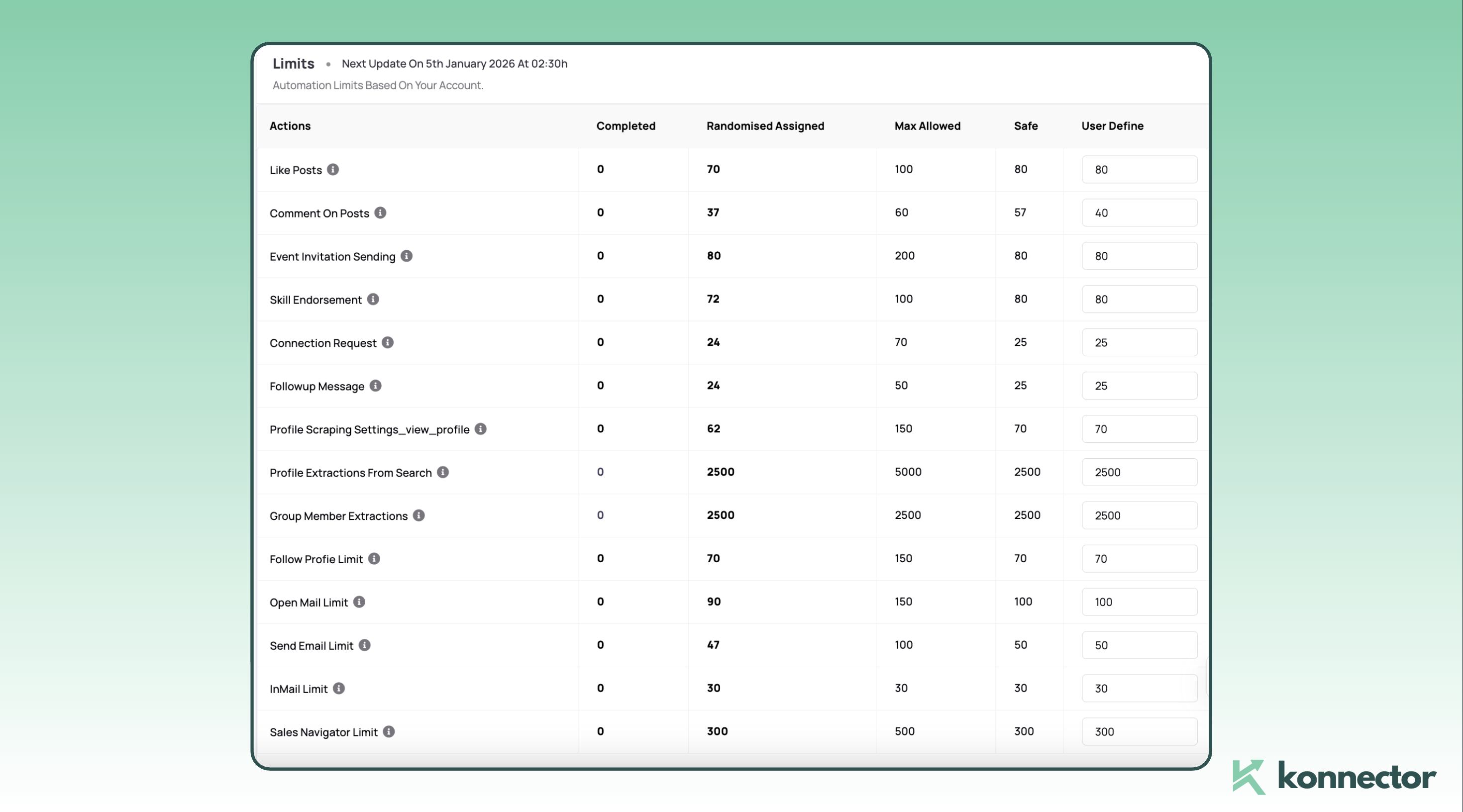
Konnector addresses both risks through three layers of protection. The Human-in-the-Loop approval system ensures no contextually inappropriate comment ever gets posted. Dedicated residential cloud IPs assigned to each account prevent the IP-level patterns that LinkedIn’s systems flag as bot-like.
Randomized posting times that vary by day and hour mimic the natural, irregular rhythm of a real human using the platform. Together, these three layers make Konnector’s approach fundamentally different from — and safer than — any fully autonomous commenting tool.
Read more—-> Best Practices for Safe and Effective LinkedIn Automation
Conclusion: Visibility Is Personal, Automation Is the Engine
The goal of using AI to comment on prospects’ posts is not to replace your voice. It is to make sure your voice is actually heard in a feed that gets noisier every year. The professionals who will build the strongest LinkedIn presence in 2026 are not those who comment the most — they are those who comment the most consistently, on the most relevant conversations, with the most genuinely contextual insight.
AI makes that consistency possible without requiring you to spend three hours a day scrolling and typing. Social Signal Intelligence finds the conversations worth joining. The Human-in-the-Loop system ensures what gets posted is always worthy of your name. And the compounding effect of showing up, repeatedly and relevantly, in your prospects’ feeds does the relationship-building work that makes every future outreach warmer, every connection request more likely to be accepted, and every sales conversation easier to start.
Real influence comes from showing up at the right time with the right insight. AI just makes sure you are there to do it.
Make the system work for you. Book a demo today!

11x Your LinkedIn Outreach With
Automation and Gen AI
Harness the power of LinkedIn Automation and Gen AI to amplify your reach like never before. Engage thousands of leads weekly with AI-driven comments and targeted campaigns—all from one lead-gen powerhouse platform.
Frequently Asked Questions
AI comments on LinkedIn are comments generated using artificial intelligence based on the context of a LinkedIn post. Tools like Konnector.ai analyze the content of a post and draft relevant responses that can help professionals engage in conversations more efficiently.
Yes, LinkedIn comments can be assisted with AI using Social Signal Intelligence platforms like Konnector.ai. These tools analyze posts and generate context-aware comments, but they use a Human-in-the-Loop system, meaning every comment must be approved before it is posted.
AI comments can be safe if they follow LinkedIn’s engagement limits and include human approval before posting. Systems that combine AI drafting with manual approval help prevent spammy behavior and reduce the risk of account restrictions.
AI comments help professionals engage with prospects publicly before sending connection requests. By participating in discussions on posts relevant to your industry, you can build familiarity and trust before initiating direct outreach.
The recommended safe range is five to ten comments per day per account. Posting too frequently may trigger LinkedIn’s engagement monitoring systems, so consistency over time is more effective than high daily volume.
Yes. Comments are LinkedIn’s strongest engagement signal. Regularly contributing meaningful comments can increase your profile visibility, expand your reach, and encourage more interaction with your own posts.
Social Signal Intelligence refers to tracking conversations happening around industry keywords. Tools like Konnector.ai monitor posts, comments, and reactions related to specific topics so users can join relevant discussions with meaningful comments.
Human-in-the-Loop means AI drafts the comment but a human approves it before it is posted. This ensures comments remain accurate, contextually appropriate, and aligned with the user’s personal brand.
AI commenting generates contextual draft responses based on the content of a post and requires human approval. Bot commenting posts generic replies automatically without review, which can lead to spammy interactions and account risk.
Yes. Consistently leaving thoughtful comments on a prospect’s posts helps build familiarity and trust. Over time this increases connection acceptance rates and creates warmer conversations before any sales outreach begins.