
If you have spent any time researching LinkedIn® automation tools, you have almost certainly seen both terms. Browser automation. API automation. Sometimes in the same sentence, sometimes used interchangeably.
They are not the same thing. The difference between them determines how detectable your outreach is, whether your account survives at scale, and which actions you can actually automate.
This is the clearest breakdown of both — what they mean, how LinkedIn® treats them, and what that means for anyone running outreach in 2026.
What Is Browser Automation?
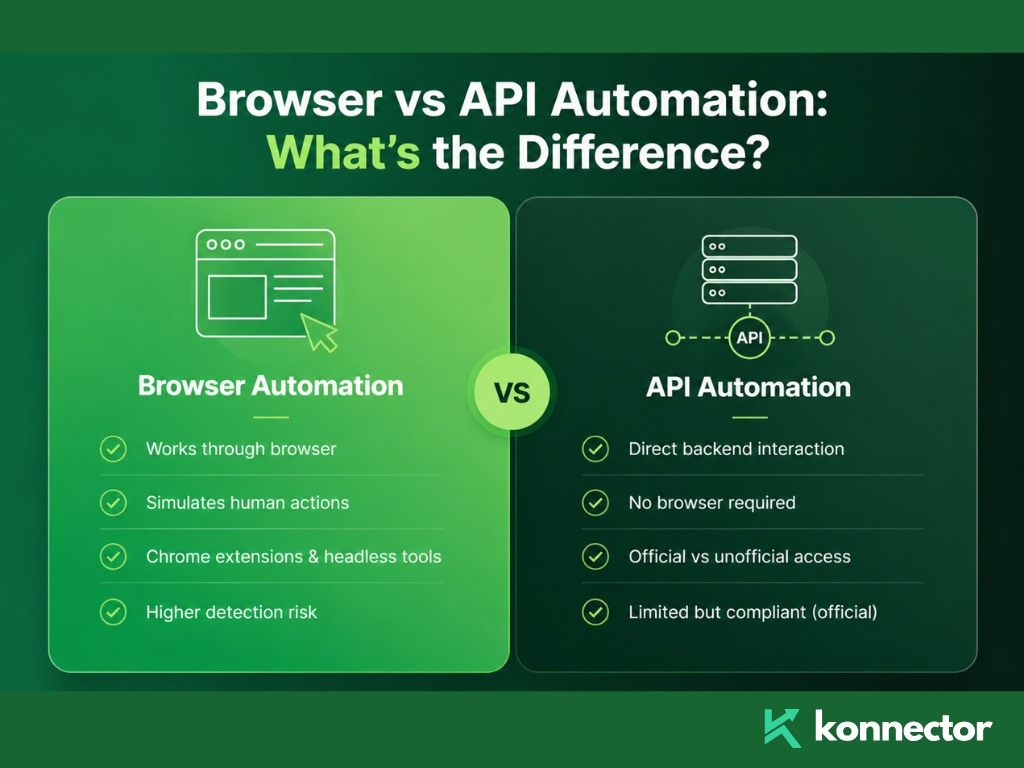
Browser automation means a piece of software controls a web browser on your behalf — clicking buttons, filling in fields, navigating between pages — the same way a human would, just without a human doing it.
There are two main forms of browser automation used with LinkedIn®:
Chrome extensions. These install directly into your browser, inject code into LinkedIn®’s page structure, and automate actions while you are logged in. They piggyback on your active session. LinkedIn® sees your real IP and your real cookies — but also sees DOM manipulation, foreign JavaScript injected into its pages, and action patterns that do not match normal human behaviour.
Headless or cloud-based browser automation. These run a browser on a remote server — not your machine. Tools using Puppeteer, Playwright, or Selenium fall into this category. They simulate a full browser environment, but from a data-centre IP, with a fake browser fingerprint, on hardware that has never had a LinkedIn® account log in before.
Browser automation tries to look like a human using LinkedIn®. The question is how convincing that impression actually is — and LinkedIn®’s detection systems in 2026 are very good at spotting the difference.
What Is API Automation?
API automation means interacting directly with LinkedIn®’s backend systems through a programmatic interface — bypassing the browser entirely.
LinkedIn® has an official API — a partner programme that lets approved companies access specific data and functions through authorised endpoints. Content scheduling, analytics, and certain CRM integrations are permitted this way. LinkedIn®’s own prohibited software policy distinguishes between unauthorised automation and official API access — they are treated very differently.
There is also unofficial API access — where tools reverse-engineer LinkedIn®’s internal API calls and mimic them programmatically. This is essentially scraping at the API layer rather than the browser layer. It is still explicitly prohibited under LinkedIn®’s User Agreement, still detectable, and carries the same account risks as browser-based scraping.
The key distinction is whether the API access is authorised by LinkedIn® or not. Official API access is permitted. Unofficial API replication is not.
How LinkedIn® Detects Each Type
| Automation Type | How It Works | Primary Detection Signal | Risk Level |
|---|---|---|---|
| Chrome extension | Injects JavaScript into LinkedIn®’s live page | DOM manipulation, foreign code in page structure, extension fingerprint scan | High — 60% higher detection risk than cloud tools |
| Cloud headless browser | Runs fake browser session on remote server | Data-centre IP, impossible travel flag, fake browser fingerprint | High — sessions flagged within 48 hours under 2026 fingerprinting |
| Unofficial API scraping | Mimics LinkedIn®’s internal API calls | API call patterns inconsistent with real user, rate anomalies | High — violates ToS regardless of volume |
| Official LinkedIn® API | Authorised partner access to approved endpoints | None — fully sanctioned | None — compliant by design |
| Hybrid model (real browser + cloud logic) | Actions run in real browser session; pacing managed in cloud | Minimal — genuine TLS fingerprint, real residential IP, human-like timing | Low — safest architecture in 2026 |

Why Chrome Extensions Are the Riskiest Option
Chrome extensions feel safe because they run inside your own browser, on your own machine, with your own IP. That local footprint is real — and for a long time it made extensions hard to detect.
That changed. LinkedIn® now actively scans for over 6,000 Chrome extensions by attempting to access static file resources associated with specific extension IDs. The presence of the extension is detectable regardless of whether it is actively running.
Beyond detection, extensions inject foreign code into LinkedIn®’s page structure. LinkedIn® performs integrity checks on its own DOM. Code injected by an extension to automate clicks, fills, and navigation leaves a signature. That signature is exactly what LinkedIn®’s 2026 session fingerprinting is built to catch.
Chrome extensions feel local and safe. But “local” does not mean “invisible.” LinkedIn® scans for them before you have even clicked a button.
Why Cloud Headless Browsers Are Not the Answer Either
The intuition behind moving to cloud-based tools makes sense: if your browser is on a remote server, your own account is protected from detection. That is not quite how it works.
Cloud tools that run headless Chrome on shared data-centre servers replace DOM injection risk with TLS fingerprint risk, IP reputation risk, and session geography risk — simultaneously.
A headless browser exposes the navigator.webdriver flag by default — a JavaScript property that signals to any website that the browser is being controlled programmatically. LinkedIn® reads this. Default Puppeteer and Playwright setups expose it clearly.
Even with evasion techniques, data-centre IPs are pre-classified as high-risk by LinkedIn®’s IP reputation database. AWS, Azure, and Google Cloud IP ranges are flagged at the authentication layer before any session is established. Add the “impossible travel” risk — your account logging in from Dublin at 9 AM and a Frankfurt server at 9:01 AM — and the compounding risk becomes serious fast.
The Architecture That Actually Works: Hybrid
The safest LinkedIn® automation architecture in 2026 combines real browser execution with cloud-managed logic.
Actions run inside a genuine browser session — real IP, real cookies, real TLS fingerprint, real Chrome environment. The cloud layer manages the intelligence: when to send, who to target, what sequence to follow, how to pace activity within safe limits. The browser does the doing. The cloud does the thinking.
This produces a session LinkedIn® cannot distinguish from manual activity — because the session signals are identical to a real person working. The only difference is that sequencing and pacing decisions happen in the cloud, not in a person’s head.
This is the execution model Konnector.ai is built on. No Chrome extension. No headless browser on a data-centre server. Every account operates with dedicated residential IP addresses, genuine browser sessions, and human-like timing variation — with human approval required before any message sends.
The goal is not to trick LinkedIn®’s detection system. It is to not give it anything to detect. Real sessions, real IPs, real behaviour — that is what safe automation looks like.
📅 Book a Free Demo → See how Konnector.ai’s hybrid architecture handles LinkedIn® automation without the detection risk.
⚡ Sign Up Free → Start running compliant LinkedIn® outreach today — no headless browsers, no Chrome extensions, no ban risk.
Browser vs API Automation: Quick Reference
| Question | Browser Automation | Official API Automation |
|---|---|---|
| What can it automate? | Connection requests, messages, profile views, likes, comments | Content publishing, analytics, authorised CRM integrations |
| Does LinkedIn® allow it? | No — prohibited under User Agreement Section 8.2 | Yes — for approved partners using authorised endpoints only |
| Detection risk? | High — DOM signals, fingerprinting, IP flags, behavioural patterns | None — sanctioned access |
| Can it send connection requests? | Yes — but at account risk | No — not available through official API |
| Safest version? | Hybrid model: real browser session + cloud-managed pacing | N/A — official API is already the standard |

Key Takeaways
- Browser automation simulates human actions in a browser. API automation interacts directly with LinkedIn®’s backend — either through official or unofficial channels.
- Chrome extensions inject foreign code into LinkedIn®’s page structure and are detectable through LinkedIn®’s scan of over 6,000 known extensions.
- Cloud headless browsers carry data-centre IP risk, impossible travel flags, and expose the navigator.webdriver signal by default.
- Unofficial API scraping mimics LinkedIn®’s internal calls — still prohibited, still detectable, same account risk as browser automation.
- Official LinkedIn® API access is fully permitted — but restricted to approved partners and limited to specific actions.
- The safest architecture in 2026 is a hybrid model: real browser session, dedicated residential IP, cloud-managed pacing, human approval before sending.
- Konnector.ai is built on this hybrid model — no Chrome extension, no headless browser, no shared infrastructure.
Further Reading
- How to Get Clients With LinkedIn® Automation
- LinkedIn® Automation in 2026: Safe Tools, Limits and Expert Strategies
- Safe LinkedIn® Automation: The Complete Guide

11x Your LinkedIn® Outreach With
Automation and Gen AI
Harness the power of LinkedIn® Automation and Gen AI to amplify your reach like never before. Engage thousands of leads weekly with AI-driven comments and targeted campaigns—all from one lead-gen powerhouse platform.
Frequently Asked Questions
Browser automation uses software to simulate human actions inside a web browser, such as sending connection requests, viewing profiles, or messaging prospects. It operates by interacting with LinkedIn®’s interface directly, often through extensions or automated browsers.
API automation interacts directly with LinkedIn®’s backend systems instead of using a browser. This can be done through LinkedIn®’s official API (approved and compliant) or through unofficial methods (reverse-engineered and prohibited).
LinkedIn® only allows automation through its official API for approved partners. All forms of browser automation and unofficial API usage violate LinkedIn®’s User Agreement and carry account risk.
Chrome extensions inject code into LinkedIn® pages, which can be detected through DOM integrity checks and extension fingerprinting. LinkedIn® actively scans for known extensions, making them one of the highest-risk automation methods.
No. Cloud-based tools introduce different risks such as data-centre IP detection, browser fingerprint inconsistencies, and “impossible travel” flags. These signals are actively monitored by LinkedIn®.
The safest approach is a hybrid model where actions run in a real browser session with a residential IP, while automation logic (timing, sequencing, targeting) is managed in the cloud.
No. The official LinkedIn® API does not support sending connection requests or automated messages. It is limited to approved use cases like content publishing, analytics, and CRM integrations.
LinkedIn® may restrict your account, reduce your activity limits, move messages to the “Other” inbox, or permanently suspend your profile depending on the severity of the violation.
Hybrid automation avoids detectable signals like injected scripts, fake browser environments, and suspicious IP activity. It operates using real sessions, making activity appear indistinguishable from human behavior.